OpenAI-compatible API latency test
HTTP 200 is not enough.
Before integrating an OpenAI-compatible API endpoint, test latency, TTFT, streaming behavior, output speed, model access, empty output, and model mismatch signals in one run.
See the kind of result you get
The report explains why an endpoint scored well or poorly, so you can share a screenshot with a clear reason instead of just saying an API feels slow.
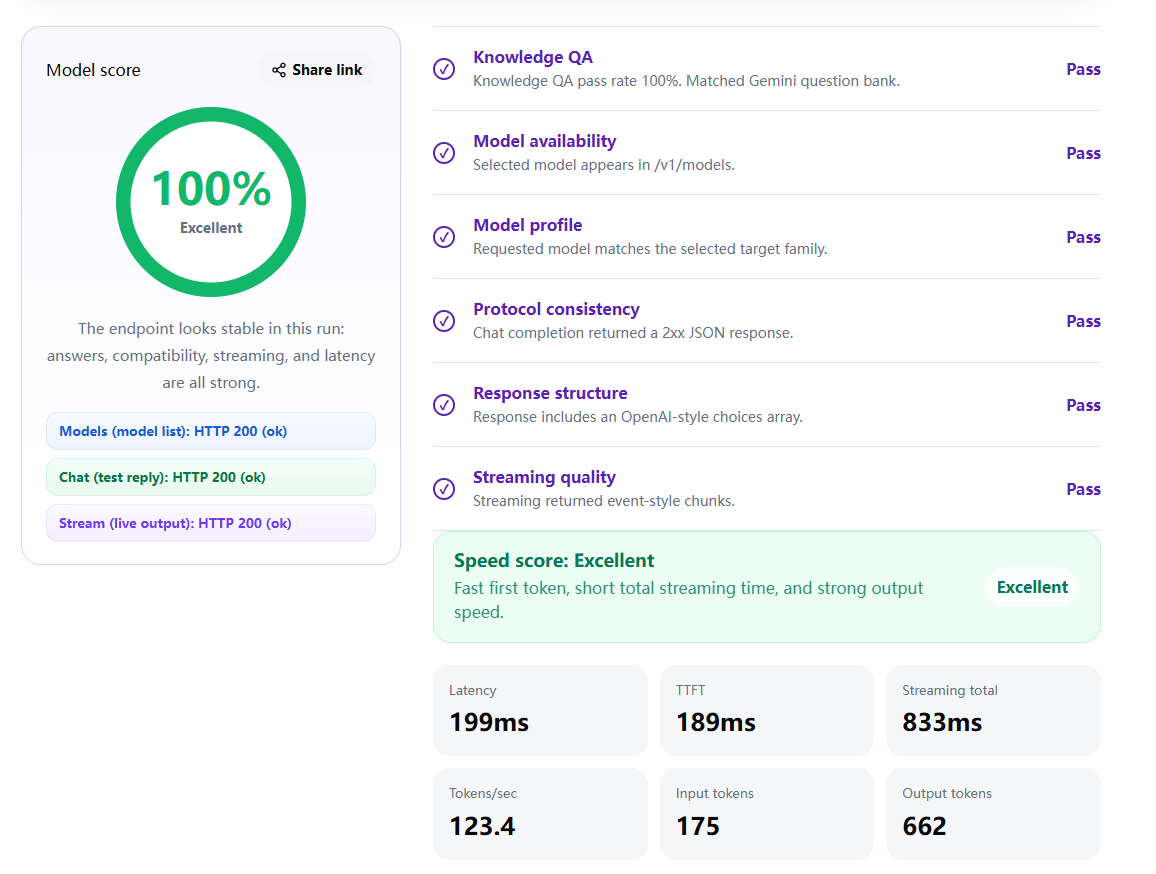
What This Test Checks
The test checks /v1/models, chat completions, streaming support, TTFT, total latency, tokens per second, empty output, model access, and model mismatch signals.
Why OpenAI API Latency Matters
A relay, gateway, or proxy can accept the request and still feel slow in a real chat app. Slow first tokens, weak output speed, or unstable streaming can make a technically valid endpoint unusable for production.
TTFT vs Total Latency
TTFT is the time to first token, which affects how quickly the user sees the answer begin. Total latency is the full time to complete the response. For streaming LLM apps, both numbers matter.
Common Problems This Can Catch
Some endpoints return HTTP 200 but produce empty output, stream very slowly, list a model that cannot be used, or route a request to a different model family than the one selected.
FAQ
Is this only for the official OpenAI API?
No. It is designed for OpenAI-compatible APIs, including relays, proxies, gateways, and provider endpoints that expose OpenAI-style paths.
What is a good TTFT?
Lower is better. The right threshold depends on model size and use case, but a fast first token is important for interactive chat apps.
Why test streaming separately?
Some APIs can complete a normal chat request but fail, delay, or format streaming chunks incorrectly.
Can a fast endpoint still be risky?
Yes. Fast empty output, model mismatch, or broken response shape is still a bad result, so the test looks beyond speed alone.
Test your endpoint before you trust it.
Run a quick check for latency, streaming, output speed, model access, and response quality.