OpenAI-compatible API guide
OpenAI Streaming Not Working?
If OpenAI-style streaming is not working, first confirm that normal chat completions work, then test whether
stream: true returns real server-sent event chunks instead of a buffered full response.
Why Streaming Breaks
Streaming can fail even when the same endpoint answers normal chat requests. The provider may not implement server-sent events, a proxy may buffer chunks, the selected model may not support streaming through that route, or the client may be parsing the stream incorrectly.
Steps to Debug Streaming
- Verify the base URL. Use the API root, such as
https://api.example.com/v1, not a dashboard URL. - Run a normal chat request. Confirm the endpoint can return a valid non-streaming answer first.
- Enable
stream: true. Check whether chunks arrive before the full answer is complete. - Inspect the stream format. Look for event-style
data:chunks and a final done marker. - Measure TTFT. A high time to first token usually means buffering, slow routing, or overloaded upstreams.
- Compare another model or route. If one model fails but another streams, the issue may be provider routing rather than your code.
Common Streaming Symptoms
| Symptom | Likely cause | What to test |
|---|---|---|
| Normal chat works, streaming fails | Streaming is not implemented or not enabled for the route | Run the same model with and without stream: true |
| All text arrives at once | Proxy or CDN buffering | Check TTFT and whether chunks arrive before completion |
| Client throws a parse error | Malformed SSE chunks or non-OpenAI response shape | Inspect raw chunks and response headers |
| Very slow first token | Slow upstream, overloaded relay, or distant region | Repeat the test and compare TTFT across providers |
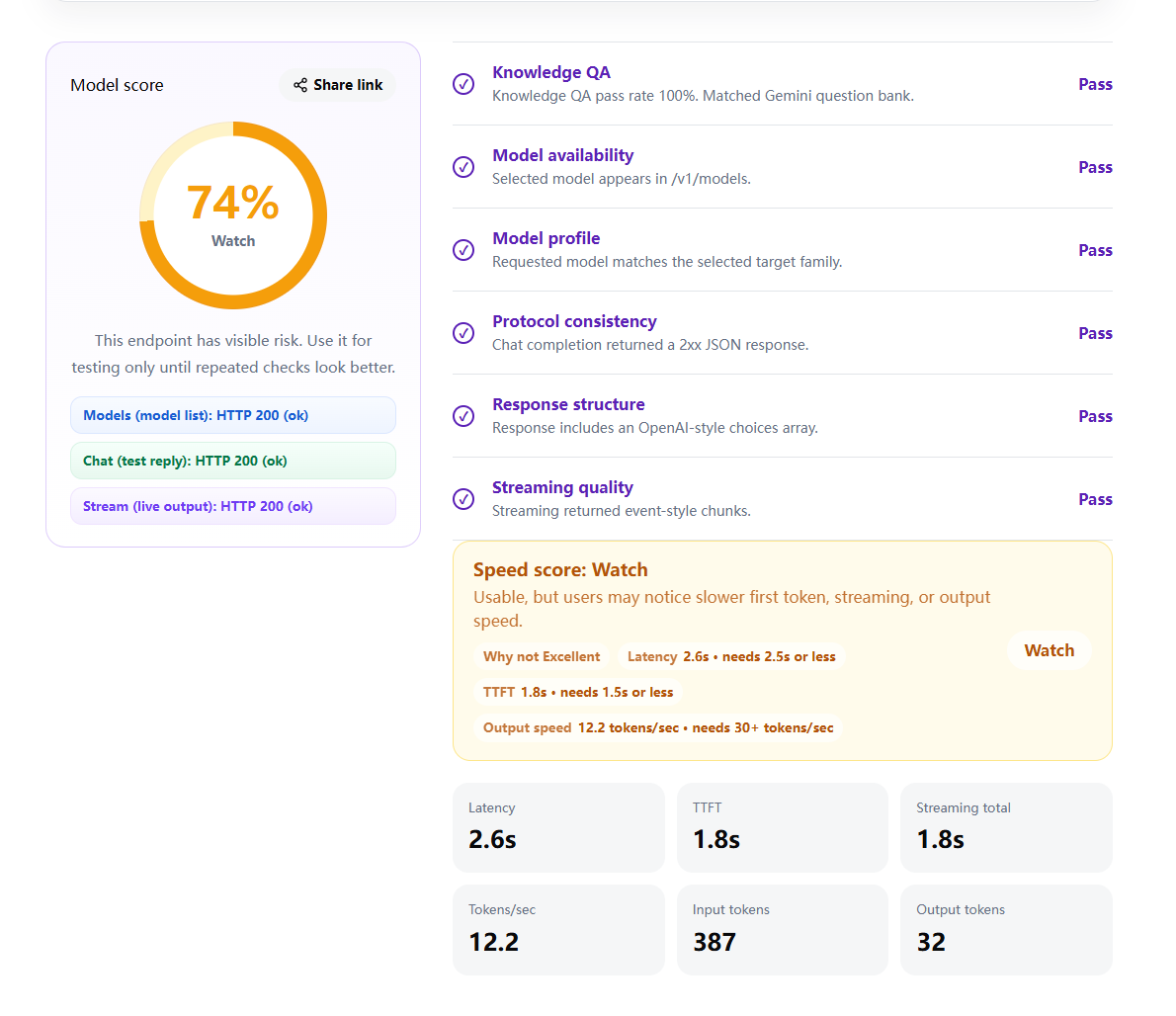
Example Result
A streaming check should show whether chunks arrive, how long the first token takes, and whether the endpoint behaves like an OpenAI-compatible API.
Run the Check
Use the checker to test normal chat, streaming, TTFT, and response shape in one run. Demo mode is available if you want to see the report before entering an API key.
FAQ
Why does streaming fail when normal chat works?
Some providers support normal chat completions but do not correctly implement server-sent event streaming, or a proxy buffers the stream until the full response is ready.
What should a streaming response look like?
A working OpenAI-style stream returns event chunks, usually as data: lines, before the final done marker.
Can a CDN or gateway break streaming?
Yes. Some proxies and gateways buffer responses, which makes streaming appear to arrive only after the full answer is complete.
Is slow TTFT the same as broken streaming?
No. Slow time to first token means streaming eventually starts, while broken streaming means chunks are missing, buffered, malformed, or never delivered.