OpenAI-compatible API guide
What Is an OpenAI API Base URL?
An OpenAI API base URL is the root endpoint your client sends API requests to, usually ending in
/v1. For OpenAI-compatible relays and gateways, the base URL replaces the official OpenAI API
host while keeping familiar paths such as /v1/models and /v1/chat/completions.
Base URL vs Dashboard URL
A dashboard URL is where you log in, manage credits, or create API keys. A base URL is the machine-readable API root that SDKs and HTTP clients call. If you paste a dashboard page into an OpenAI client, requests will usually fail because the client will append API paths to the wrong host.
| URL type | Example | Use it in code? |
|---|---|---|
| Official OpenAI base URL | https://api.openai.com/v1 |
Yes, for official OpenAI requests |
| Relay or gateway base URL | https://api.example.com/v1 |
Yes, if the provider is OpenAI-compatible |
| Dashboard or billing page | https://example.com/dashboard |
No, this is not an API endpoint |
| Documentation page | https://example.com/docs |
No, use it only to find the real base URL |
Why Base URL Problems Happen
Base URL mistakes are common because every provider labels it differently. Some call it an API endpoint, proxy URL, relay URL, compatible endpoint, gateway host, or server URL. The safest check is to test the final path your client will call, not just whether the provider's website opens in a browser.
How to Check a Base URL
- Find the API root. Look for a URL that ends in
/v1or is documented as an OpenAI-compatible endpoint. - Open the models path. The checker will try
/v1/modelsto confirm the endpoint can expose or accept model access. - Run a chat request. A valid base URL should work with an OpenAI-style chat completions payload.
- Test streaming. A relay can accept normal chat but still fail when
stream: trueis used. - Save a share link. Share only the base URL and model, never the API key.
Example Result
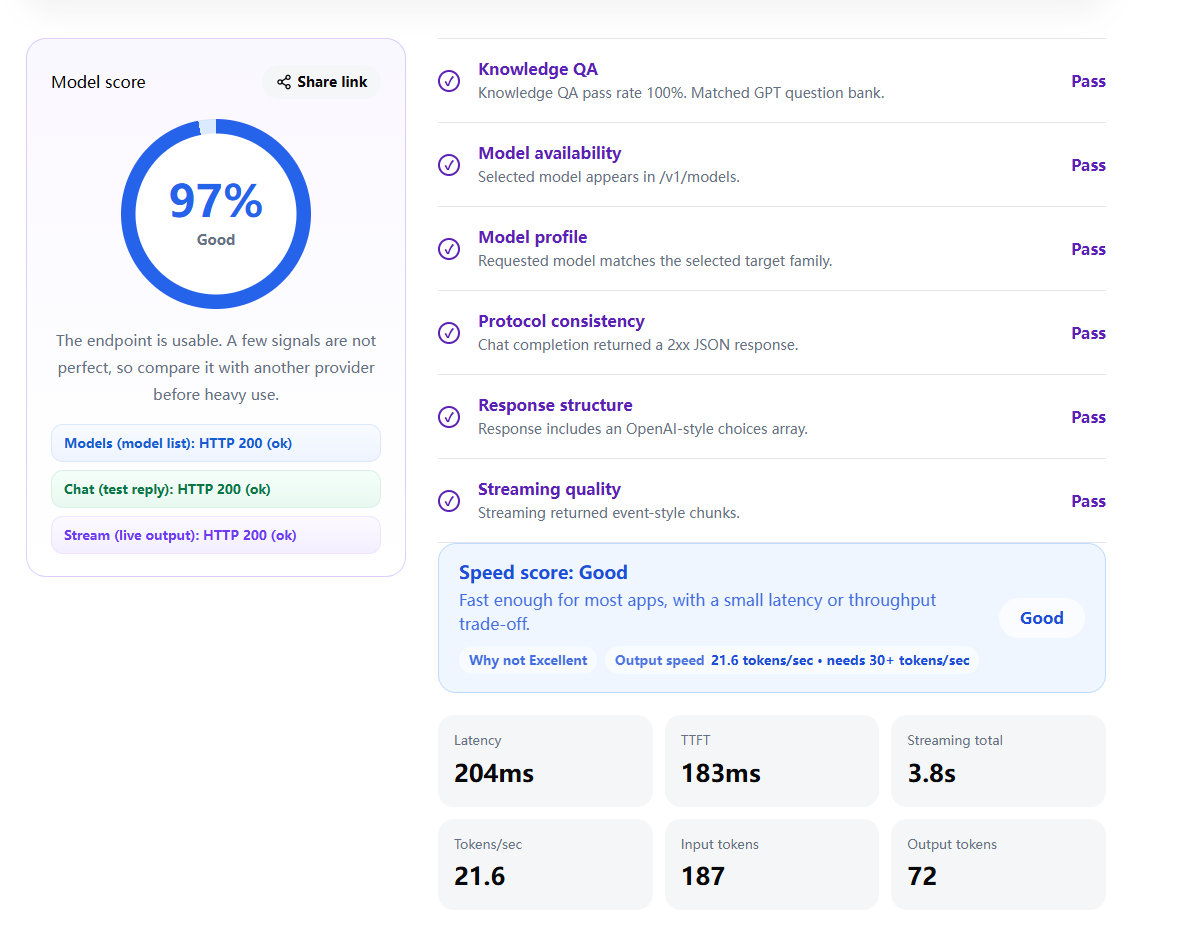
A good base URL should pass model access, chat, streaming, and response-shape checks. Speed can still vary, so test more than once before connecting a production app.
Run the Check
Paste the base URL, choose a model, and run a live compatibility check. You can also use demo mode first if you do not want to enter an API key.
FAQ
Does the base URL always end in /v1?
For OpenAI-compatible APIs, it commonly ends in /v1. Some providers hide that detail in SDK examples, so follow the provider's API documentation and test the final endpoint.
Can I use a provider homepage as the base URL?
No. A homepage or dashboard URL is meant for humans. Your app needs the API root that accepts OpenAI-style HTTP requests.
Why does /v1/models fail but chat works?
Some relays do not expose model listing even though they accept a known model id. In that case, test chat and streaming with the exact model you plan to use.
Should I include my API key in a share link?
No. Share links should include only safe values such as the base URL and model name. Never put an API key in a URL.
Is a working base URL enough for production?
No. A working base URL proves the endpoint shape is usable, but you should still check latency, TTFT, streaming stability, and provider reliability over time.